Best Keyboard for CS2
The keyboards CS2 pros actually use, ranked by live usage data from cs2pedia's pro dataset - plus what Rapid Trigger does, which form factor fits, and which board to buy at every budget.
A counter-strafe only registers if the game sees you release one movement key and tap the opposite one in the right window. On an old Cherry MX board, every keystroke carries a debounce delay - a few milliseconds the firmware waits to confirm the press is real and not switch noise - plus a fixed actuation point partway down the key.
Stack those up across a tight A-D-A peek and the timing slips: a ghost input, a strafe that fires late, a shot that goes wide.
Hall-effect keyboards killed that problem. Magnetic sensors read the analog position of each key continuously, so there’s no debounce window and you choose how far down the key registers. With Rapid Trigger, the key re-arms the instant you start lifting it, instead of waiting to travel back past a fixed reset point.
That single change is why the CS2 keyboard meta turned over. The table below, computed live from cs2pedia’s dataset, shows how far it’s gone.
Why Rapid Trigger Changed the CS2 Keyboard Meta
Rapid Trigger is the feature that justifies this whole shift, so it’s worth defining precisely. On a normal mechanical switch, a key registers as “pressed” at a fixed actuation point and stays pressed until it travels back up past a fixed reset point. Rapid Trigger throws out the fixed points: the key registers a release the moment it moves up by a set amount, and re-presses the moment it moves back down.
Combined with hall-effect sensing - magnetic switches that report exactly how far each key is depressed, rather than a simple on/off - that makes the gap between releasing one key and pressing another as short as the hardware can read it.
In CS2 specifically, that gap is counter-strafing. Stopping cleanly to take an accurate shot means releasing your current strafe key and tapping the opposite direction for one frame to cancel your momentum. Rapid Trigger shaves the input lag out of that exchange, so your stops are tighter and your first shot lands sooner. It matters more here than in most games because CS2 punishes inaccurate movement harder than almost any other shooter.
And to head off the obvious question: Valve has confirmed Rapid Trigger is allowed in CS2. It’s a hardware actuation feature, not a macro or a scripted input, so it’s tournament-legal.
Pro Keyboard Usage Right Now
Two hall-effect boards sit at the top of the table above, and the gap between them and everything else is large. Wooting leads the field, Razer’s analog Huntsman line is a close second, and between them they account for a commanding chunk of every keyboard-equipped pro in the dataset.
Logitech is the third force, carried by its own hall-effect entries plus a long tail of older optical and mechanical G Pro boards still in service. Look past the top two and the share drops off a cliff - most individual models past the leaders sit in low single digits.
The brand picture tells the same story as the model picture. The boards built around magnetic switches and Rapid Trigger have taken the field, and the mechanical flagships that ruled the 2018–2022 era - the Cherry MX HyperX Alloy and Corsair K-series boards that older guides still recommend - have collapsed to a thin remainder.
This is the cleanest meta break in CS2 peripherals. The mouse market rearranged its brand order over five years; the keyboard market changed its underlying switch technology outright.
The Best Keyboards for CS2 (Our Picks)
These picks follow pro usage in our dataset, top-down. Every one is a current, purchasable hall-effect or analog-optical board - nothing here is a discontinued Cherry MX relic. Two of the most-used boards are sold direct by the manufacturer and never reached Amazon, so for those we say so plainly and point you to the real store instead of faking a “buy” button; where a pick has a clean retail page, we link it.
Wooting 80HE
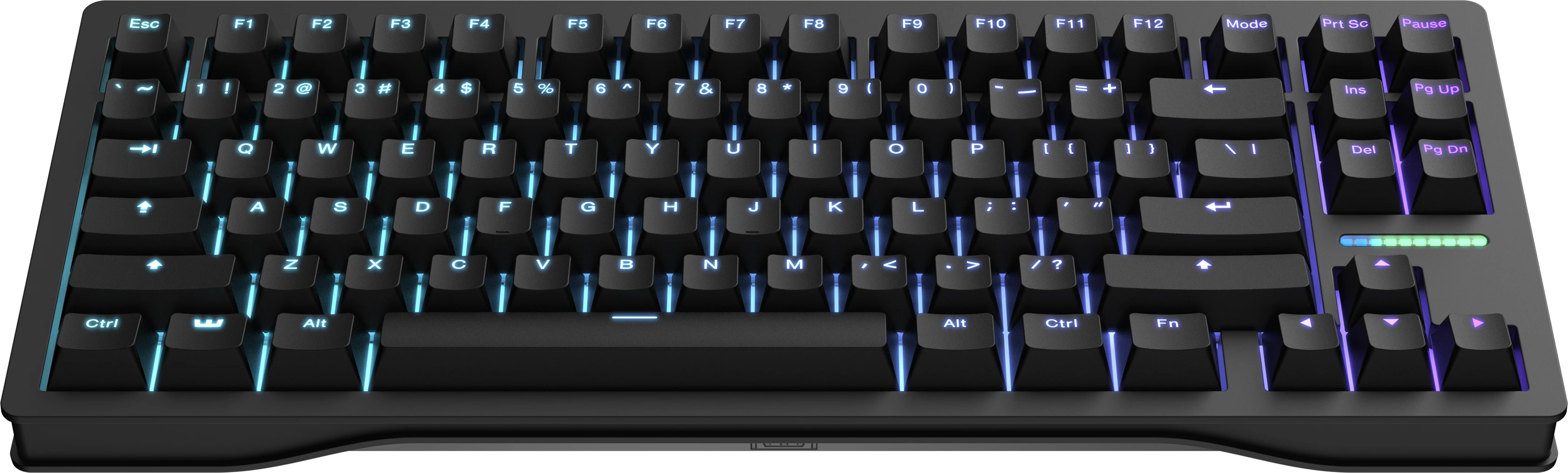
The single most-used keyboard in the dataset, and the board the rest of this list is measured against. It’s an 80% layout - full TKL functionality in a slightly tighter frame - built on Lekker magnetic switches with per-key Rapid Trigger down to fractions of a millimetre and 8 kHz polling (how many times per second the board reports to the PC; 1000 Hz is the long-standing baseline, 8000 Hz the premium tier).
It leads the usage table above by a clear margin, and notably it got there organically: Wooting doesn’t sponsor a stack of major orgs, so its position is players choosing it on merit rather than contract.
The catch is purely commercial. Wooting sells the 80HE direct from wooting.io and it isn’t carried on Amazon, so there’s no clean affiliate link to give you - and we’re not going to dress up a dead-end search page as a buy button. Treat this as the editorial number-one: if you want the most-used board in pro CS2 and don’t mind ordering direct, the 80HE is it.
Razer Huntsman V3 Pro TKL
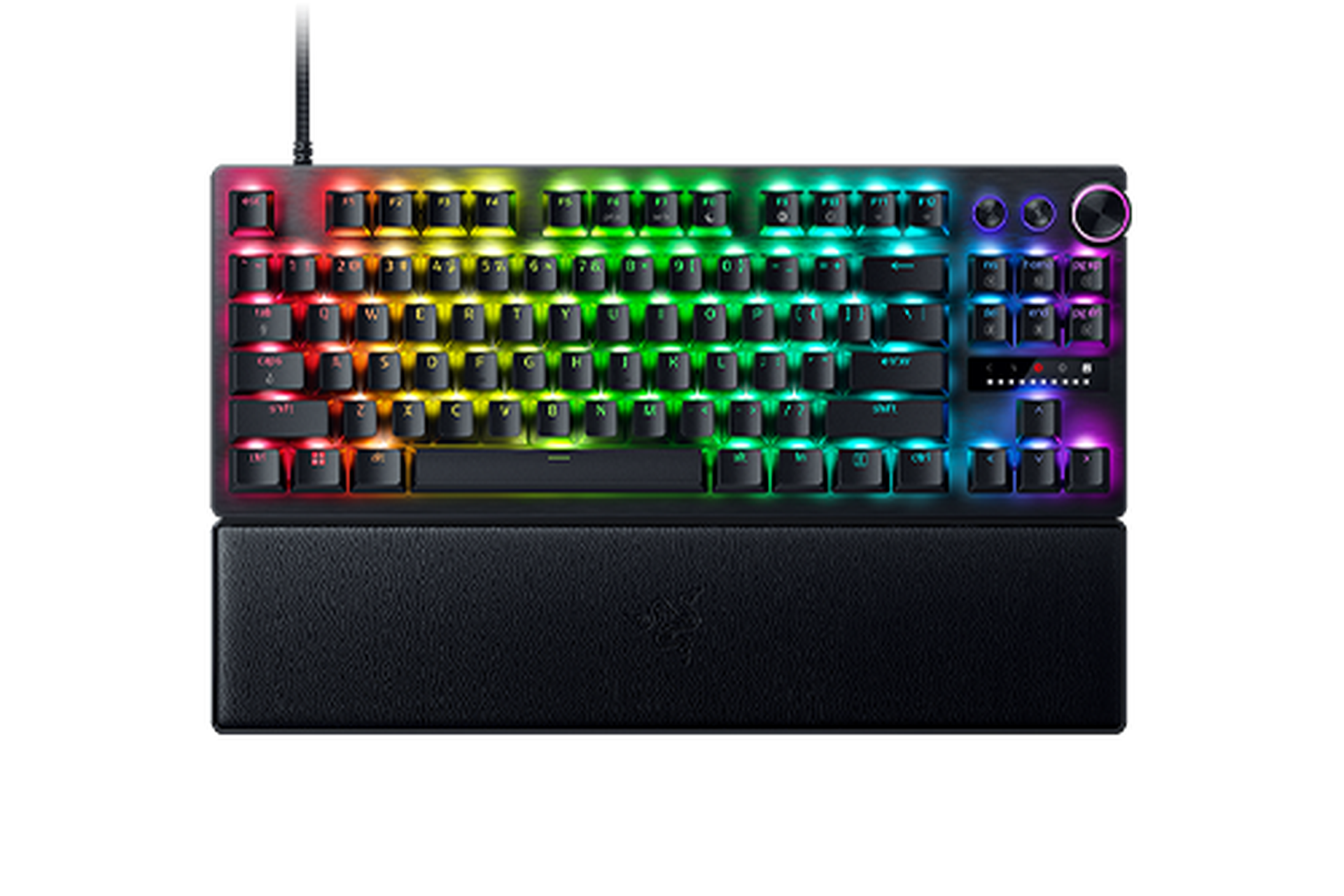
Razer Huntsman V3 Pro TKL
The most-used board you can actually buy on Amazon. TKL analog-optical, 8 kHz polling, Snap Tap for cleaner counter-strafes. The practical default.
The second most-used board in the dataset and, for most buyers, the one to actually purchase. It’s a tenkeyless analog-optical board - Razer’s optical switches read key position continuously the way hall-effect ones do, so it gets the same adjustable actuation and Rapid Trigger behaviour - with 8 kHz polling and Snap Tap, a feature that prioritizes the most recently pressed of two opposing movement keys to make counter-strafe stops even cleaner.
It sits just behind the Wooting in the table above, and unlike the Wooting it has a clean retail page, which makes it the practical default.
Wooting 60HE+
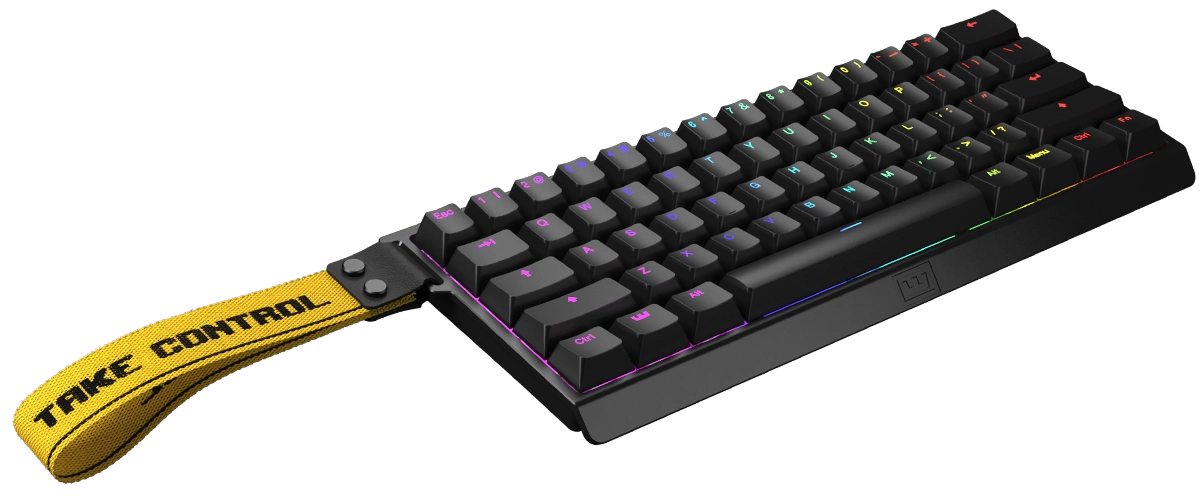
The 60% option for low-sensitivity players. It strips the function row, arrows, and navigation cluster down to a compact 60% footprint, which clears desk space for the big arm-sweeps a low-sens player makes - the same Lekker magnetic switches and Rapid Trigger as the 80HE, just in a smaller body.
It holds a meaningful slice of the pro field in the table above, well behind the two leaders but ahead of the long tail. That’s impressive for a layout that forces you onto a function-key layer for anything that isn’t a letter.
Like its bigger sibling it’s a wooting.io direct purchase, not an Amazon product, so it stays an editorial pick: the 60HE+ is the one to get if you run low sens and want the most space for your mousepad.
Logitech G Pro X TKL RAPID
Logitech’s hall-effect entry and its bid to stay in a market its mechanical boards used to own. It’s a tenkeyless magnetic-switch board with adjustable actuation, Rapid Trigger, and a detachable USB-C cable for transport.
It carries a modest share of the pro field in the table above - a fraction of the leaders, sitting among Logitech’s cluster of G Pro boards rather than challenging the top - but it’s a credible board for players already inside the Logitech ecosystem.
We can’t point you at a clean product page for this one, so treat it as an editorial mention rather than a buy link: worth a look if brand consistency with your mouse and software matters to you, but the Huntsman is the safer purchase.
SteelSeries Apex Pro TKL Gen 3
The pick for players who want a wireless hall-effect board. It’s a tenkeyless magnetic-switch board with adjustable actuation and Rapid Trigger, an OLED status display, and - uniquely among the boards here - an available wireless variant, which no other major hall-effect TKL offers.
It sits in the lower reaches of the usage field rather than near the top, but it’s the answer to a specific need: an analog board you can run cable-free. We treat it as editorial too. If a clean retail page is what you want, the Huntsman remains the linked pick, but the Apex Pro is the one to compare against if wireless is a hard requirement.
Budget Hall-Effect: DrunkDeer A75 Pro and AULA WIN60 HE
You don’t need a flagship price to get Rapid Trigger anymore. Two value boards bring it well under the flagship tier:
- DrunkDeer A75 Pro - adjustable magnetic actuation and Rapid Trigger in the rough $80–100 range.
- AULA WIN60 HE - pushes the floor down near $40 with 8000 Hz polling and Rapid Trigger reset measured in hundredths of a millimetre.
Neither shows up in the top tier of the pro dataset - they’re value boards, not the flagships the field competes on - and neither has a clean retail page we’ll link, so they’re editorial recommendations, not CTAs.
But the headline matters: the feature that genuinely moves competitive results is no longer locked behind a $200 board. If budget is the constraint, a sub-$100 hall-effect board gets you the part that counts.
What Pros Use vs What You Should Buy
Keyboard choice carries the same sponsor caveat as any “what pros use” list. Razer, Logitech, and SteelSeries all run pro teams, so a player’s board is sometimes a contract detail rather than a free pick. Razer’s Huntsman, for instance, ships in player-edition colourways tied to sponsored stars - but those are cosmetic: the player-edition board and the standard Huntsman V3 Pro TKL are the same hardware, so the standard version is the one to buy.
Wooting is the useful control case here. It doesn’t sponsor a stack of major orgs, yet it leads the usage table above - which tells you its position is players choosing it, not contracts placing it.
So read the table the way you’d read any sponsor-mixed dataset: the two boards at the top are used by so many pros, across so many different orgs, that no single sponsorship explains their dominance. Buy either with confidence. Past that, buy for your situation, not the leaderboard - your sensitivity and your desk space decide your form factor more than a pro’s contract does.
How to Set Up Rapid Trigger for CS2
The board does nothing for you out of the box at default settings; the actuation and Rapid Trigger values are where the benefit lives. A sensible competitive starting point:
- Actuation (WASD movement keys): shallow, around 0.2–0.4 mm, so a light touch registers and your strafes fire fast.
- Rapid Trigger reset (how far you lift before the key counts as released): tight, around 0.1–0.2 mm, so the key re-arms almost the instant you start lifting.
That combination is what tightens your counter-strafes.
Leave your non-movement keys (utility binds, jump, ESC) at a deeper actuation so you don’t fat-finger them mid-fight; the shallow settings only pay off on the keys you’re constantly tapping to move. Most boards let you set actuation per-key for exactly this reason. And to repeat the point that makes all of this worth doing: Rapid Trigger is legal in CS2 - it’s a hardware actuation feature, not a script, so tuning it is fair game.
Size Guide: TKL vs 60% vs 65%
Form factor is the real decision once you’ve settled on a hall-effect board, and it comes down to how much desk you want for your mouse:
| Form factor | What it is | Who it’s for |
|---|---|---|
| TKL (tenkeyless) | Full layout minus the numpad | Most pros; the default - keeps arrows and function row, frees the right side for mouse swing |
| 60% | Letters and modifiers only; everything else on a function layer | Low-sens players who want maximum mouse space and don’t mind layered keys |
| 65% | 60% plus arrow keys and a few navigation keys | The middle ground - most of the space saving without losing arrows |
The vast majority of the pro field runs TKL, and it’s the safe default: you lose the numpad, which CS2 never uses anyway, and keep everything else. Drop to 60% only if you run genuinely low sensitivity and want every spare centimetre for your mousepad. 65% is the compromise if a true 60% feels too stripped. There’s no performance difference between the three - this is purely about desk real estate and how often you reach for arrow keys.
Choosing on Budget
The good news is that the feature that matters - Rapid Trigger on hall-effect or analog-optical switches - now exists at every price tier, so budget changes which board, not whether you get the capability:
- Under $50. The AULA WIN60 HE puts Rapid Trigger and 8000 Hz polling at the floor of the market. It’s a 60% editorial pick, not a pro-field flagship, but it gets you the part that counts on the tightest budget.
- $80–130. The DrunkDeer A75 Pro is the value sweet spot - adjustable magnetic actuation and Rapid Trigger without the flagship premium. Editorial recommendation; no clean retail link, but a strong mid-tier board.
- $150 and up. This is the flagship tier and where your real buy lives. The Razer Huntsman V3 Pro TKL is the monetizable, in-stock pick with a clean retail page - buy this if you want a proven board today. The Wooting 80HE is the editorial king of the dataset but ships direct from wooting.io rather than Amazon, so it’s an order-direct decision, not a one-click one.
A Note on the Data
These rankings reflect real pro usage, computed at build time from cs2pedia’s dataset of 1,000+ active pro profiles. That’s the whole point of this guide: the numbers are live and sourced from the same database that powers the rest of the site, not a hand-typed list that goes stale the moment a player switches boards. Hardware changes between events, though, and the dataset is a snapshot rather than a live feed - so treat the exact ordering as current-but-not-instant.
If you want to dig further: browse every keyboard in the dataset on the keyboard gear page or the full gear index, see the underlying usage stats, or check individual player profiles to see exactly who runs what.
The rest of the setup matters too. The keyboard is a smaller raw-aim lever than the mouse, but Rapid Trigger is the one keyboard feature that genuinely moves competitive results, so it’s worth getting right. Pair it with the right monitor and see the full setup guide to tie it together.
Affiliate disclosure: some links on this page are affiliate links, and a purchase may earn cs2pedia a commission at no extra cost to you. This does not influence which products appear or how they are ranked - the rankings reflect real pro usage data, full stop.